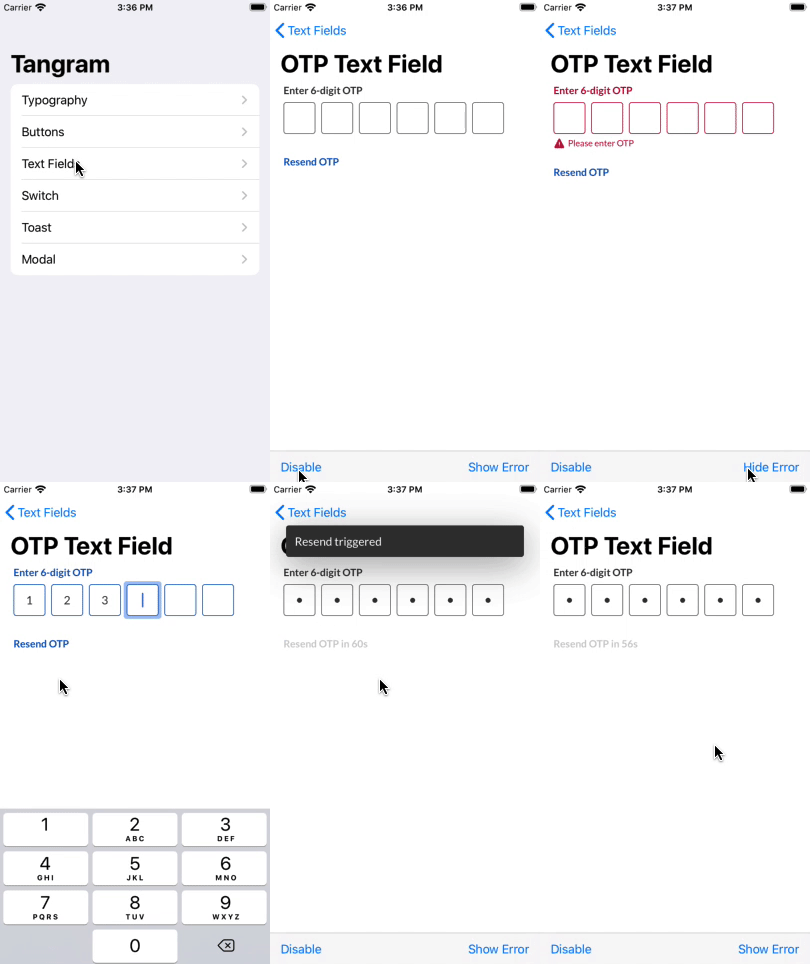
OTPTextField is a basic component of Tangram that includes a title label, a specific number of text fields, helper text and resend button for your OTP. You can instantiate a new otp text field by an init method:
OTPTextField is a basic component of Tangram that includes a title label, a specific number of text fields, helper text and resend button for your OTP. You can instantiate a new otp text field by an init method:
init(label: String,
     helperText: String? = nil,
     length: Int = 6,
     resendTime: Int = 60,
     otpCallback: @escaping (String) -> Void,
     resendCallback: @escaping () -> Void)
The default lenght for the OTP is 6, minimum is 4 and maximum is 6 also. The default cool down time for resend button is 60
OTP Text Field supports error state:
let otpTextField = OTPTextField(label: "Enter 6-digit OTP",
                                otpCallback: { otp in
                                  // validate your otp
                                  Toast.show(with: "OTP is \(otp)")
},
                                resendCallback: {
                                  // call resend OTP API
                                  Toast.show(with: "Resend triggered")
})

// Show error state
otpTextField.isError = true

// Hide error state
otpTextField.isError = false

// Show error with message
otpTextField.setError(with: "Invalid OTP.")
While showing the error state, the otp text field will change the colour into red colour and helper text will show an alert indicator.
OTP Text Field support the Dynamic font size accessibility functionality by default. You don't need to configure anything, just testing your UI in case of size changes.